MongoDB Atlas 說明 (官網的文件寫的非常詳細,對於初學者有很大幫助)
Download .NET Core 2.2
ASP.NET Core 2.2 簡介
Visual Studio Code (參考 使用Visual Studio Code开发.NET Core看这篇就够了 安裝 C#)
MongoDB Atlas是官方 MongoDB雲端的方案,可以建立一個 Free Tier Cluster,容量大小是有限制的。
MongoDB對於各語言都有對應的 driver,對 C#也有很好的支持, 2017年 12月就使用 ASP.Net Core 1.x的版本連結至 Atlas時,在本機端 (Windows)是沒有問題的,但因為我想使用 docker + jenkins佈署程式到 CentOS卻發生問題,後來在 MongoDB官網說明,.Net Core library在 Linux or OSX不支援 SNI TLS Extension,所以無法連到 Atlas Free Tier Cluster,所以後續開發程式改用別的方法進行。
但最近 MongoDB官網提出新的說明,只要使用 .Net Core 2.1以上的版本就可以開始連線,這部分用 Visual Studio Code使用 ASP.NET Core 2.2進行程式測試,在本機端 (Windows) OK,用 Docker在 CentOS上測試也沒問題。
2019年7月11日 星期四

2024年12月11日 星期三
測試 Passwordless with ASP.Net Core + Angular
2016年11月10日 星期四
再見了 Web.config,Asp.Net Core使用了 appsettings.json
官網:Asp.Net Core Configuration
其它連結:
The New Configuration Model in ASP.NET Core
No ConfigurationManager in ASP.NET Core
長久以來,不管是 Asp.Net MVC或是 Form的開發,一定要使用到 Web.config,而在程式碼內就會使用到 ConfigurationManager來取得資料庫連線字串 (ConnectionStrings)或是自定變數,但是在 Core已經不採用這樣的方式了,所以要參考上面的文章,要自訂類別,在 startup.cs內來儲存 appsettings.json的變數,而在 controller才可以利用系統 DI方式取得想要的設定值,雖然一開始可能不太適應,但萬事起頭難,用久就會習慣了。
其它連結:
The New Configuration Model in ASP.NET Core
No ConfigurationManager in ASP.NET Core
長久以來,不管是 Asp.Net MVC或是 Form的開發,一定要使用到 Web.config,而在程式碼內就會使用到 ConfigurationManager來取得資料庫連線字串 (ConnectionStrings)或是自定變數,但是在 Core已經不採用這樣的方式了,所以要參考上面的文章,要自訂類別,在 startup.cs內來儲存 appsettings.json的變數,而在 controller才可以利用系統 DI方式取得想要的設定值,雖然一開始可能不太適應,但萬事起頭難,用久就會習慣了。
2016年12月22日 星期四
使用 ASP.Net Core Web API 實作 Line Bot webhook callback
參考
Line 官方 Message API文件
ASP.NET Web API 實作 Line Bot 使用 Azure App Service
我是使用 Line V2 messaging API的版本和 ASP.Net Core Web API,所以在參考 ASP.NET Web API 實作 Line Bot 使用 Azure App Service,時要先參考Line 官方 Message API文件 新版 api的使用方式,還有 .Net Core改用 HttpClient實作,以下是實作結果,年底快到了,先讓自己開心一下。
其它分享:
Line Bot 分機及MVP查詢應用, 在iPhone上如何讓在 Line 訊息上可以點選簡碼撥打電話, calling link
Use Line Bot to search extensions and MVPN numbers of the enterprise
使用 ASP.Net Core Web API 開發 Line bot, messaging api可以顯示 emoji或 sticons的圖示
Line 官方 Message API文件
ASP.NET Web API 實作 Line Bot 使用 Azure App Service
我是使用 Line V2 messaging API的版本和 ASP.Net Core Web API,所以在參考 ASP.NET Web API 實作 Line Bot 使用 Azure App Service,時要先參考Line 官方 Message API文件 新版 api的使用方式,還有 .Net Core改用 HttpClient實作,以下是實作結果,年底快到了,先讓自己開心一下。
其它分享:
Line Bot 分機及MVP查詢應用, 在iPhone上如何讓在 Line 訊息上可以點選簡碼撥打電話, calling link
Use Line Bot to search extensions and MVPN numbers of the enterprise
使用 ASP.Net Core Web API 開發 Line bot, messaging api可以顯示 emoji或 sticons的圖示

2016年12月7日 星期三
ASP.NET Core Render View to String in Controller
參考文章:
ASP.NET Core Render View to String
Render a Razor View containing a URL to a string in ASP.NET Core
這個目的是直接在 controller直接產生 partial view的字串再回傳至 view ajax result,然後直接把某個 element換掉或作內文休改,這種方式當然也有其它的方式達成,但直接在 contorller內產生 view string也是可以試試,因為在 Asp.net MVC 5也有類似的作法或是直接使用 westwind的 library。但在 Asp.net Core就不能直接拿來用。所以參考上面的分享文章就可以達到目的了。
ASP.NET Core Render View to String
Render a Razor View containing a URL to a string in ASP.NET Core
這個目的是直接在 controller直接產生 partial view的字串再回傳至 view ajax result,然後直接把某個 element換掉或作內文休改,這種方式當然也有其它的方式達成,但直接在 contorller內產生 view string也是可以試試,因為在 Asp.net MVC 5也有類似的作法或是直接使用 westwind的 library。但在 Asp.net Core就不能直接拿來用。所以參考上面的分享文章就可以達到目的了。
2013年4月18日 星期四
MongoDB 和 Asp.Net MVC
A MONGODB TUTORIAL USING C# AND ASP.NET MVC 使用 ASP.NET MVC 3和 MONGODB實作了一個 BLOG網站,大家可以試試看,我自己還在消化,有幾點可以和大家分享
我使用是 APS.NET MVC 4 和 MONGODB C# DRIVER 1.8.1.20和一個 MONGODB 是放在 SERVER上,所以使用宓碼連結
連結 MONGO的寫法要改成如下
var client = new MongoClient("mongodb://userName:passWord@ipaddress/dbName");
var server = client.GetServer();
var db = server.GetDatabase("dbName");
可以成功執行後,我想要讓 CKEDITOR 可以上傳圖片,就 ASP.NET MVC來說,還是要使用 CK FINDER FOR ASP.NET的版本
可以在 CKEDITOR 的 config.js 內加上
config.filebrowserImageBrowseUrl = '/Scripts/ckfinder/ckfinder.html?type=Images';
config.filebrowserUploadUrl= '/Scripts/ckfinder/core/connector/aspx/connector.aspx?command=QuickUpload&type=Files';
config.filebrowserImageUploadUrl= '/UploadImage/Upload'; //controller/actionName
在 CKFINDER的 config.ascx
public override bool CheckAuthentication() 依權限 return true;
public override void SetConfig()
我的 CKFINDER是放在 Scripts的目錄,所以 BaseUrl = "~/Scripts/ckfinder/userfiles/";
客制的 UPLOAD CONTROLLER
CK Finder for asp.net V2.3.1 download
參考網址
A MONGODB TUTORIAL USING C# AND ASP.NET MVC
CSharp Driver Tutorial
Authenticate to MongoDB with the C# Driver
Integration of CkFinder with Ckeditor failed in my Asp.net mvc3.How can i successfully integrate it?
Integrating CKEditor with a Custom File Browser
Splitting DateTime - Unit Testing ASP.NET MVC Custom Model Binders
ASP.NET MVC Model Binding and Data Annotation
MongoDB实战开发
我使用是 APS.NET MVC 4 和 MONGODB C# DRIVER 1.8.1.20和一個 MONGODB 是放在 SERVER上,所以使用宓碼連結
連結 MONGO的寫法要改成如下
var client = new MongoClient("mongodb://userName:passWord@ipaddress/dbName");
var server = client.GetServer();
var db = server.GetDatabase("dbName");
可以成功執行後,我想要讓 CKEDITOR 可以上傳圖片,就 ASP.NET MVC來說,還是要使用 CK FINDER FOR ASP.NET的版本
可以在 CKEDITOR 的 config.js 內加上
config.filebrowserImageBrowseUrl = '/Scripts/ckfinder/ckfinder.html?type=Images';
config.filebrowserUploadUrl= '/Scripts/ckfinder/core/connector/aspx/connector.aspx?command=QuickUpload&type=Files';
config.filebrowserImageUploadUrl= '/UploadImage/Upload'; //controller/actionName
在 CKFINDER的 config.ascx
public override bool CheckAuthentication() 依權限 return true;
public override void SetConfig()
我的 CKFINDER是放在 Scripts的目錄,所以 BaseUrl = "~/Scripts/ckfinder/userfiles/";
客制的 UPLOAD CONTROLLER
public ActionResult Upload(HttpPostedFileBase upload, string CKEditorFuncNum, string CKEditor, string langCode)
{
string url; // url to return
string message; // message to display (optional)
//CODE FOR SAVE IMAGE HERE
url = "/" + path + "/" + filename;
string output = @"";
return Content(output);
}CK Finder for asp.net V2.3.1 download
參考網址
A MONGODB TUTORIAL USING C# AND ASP.NET MVC
CSharp Driver Tutorial
Authenticate to MongoDB with the C# Driver
Integration of CkFinder with Ckeditor failed in my Asp.net mvc3.How can i successfully integrate it?
Integrating CKEditor with a Custom File Browser
Splitting DateTime - Unit Testing ASP.NET MVC Custom Model Binders
ASP.NET MVC Model Binding and Data Annotation
MongoDB实战开发
PHP實作 Ckeditor+Ckfinder檔案上傳 動態指定儲存位置
其它..
在 Global.asax.cs 的 protected void Application_Start() 加上
ModelBinders.Binders.Add(typeof(ObjectId), new ObjectIdBinder()); //自動產生 mongoID
monogo基本指令
show dbs
show collections
use --dbName
db.--collectionsName.find()
mogodb C# driver 請直接用 negut就可以找的到
mogodb C# driver 請直接用 negut就可以找的到
2017年8月17日 星期四
Asp.Net Core 2.0 Razor Pages - MVC外的新選擇
如果你在學 Asp.Net MVC時對其目錄結構,不是那麼容易了解的話,現在在 Core 2.0提供一個 Razor Pages讓以前寫 Asp.Net Web Form的使用者能夠更容易上手
相關文章參考:
ASP.NET Razor Pages vs MVC – How do Razor Pages fit in your toolbox?
Introduction to Razor Pages in ASP.NET
為什麼比較容易懂 ?
reference from ASP.NET Razor Pages vs MVC – How do Razor Pages fit in your toolbox?
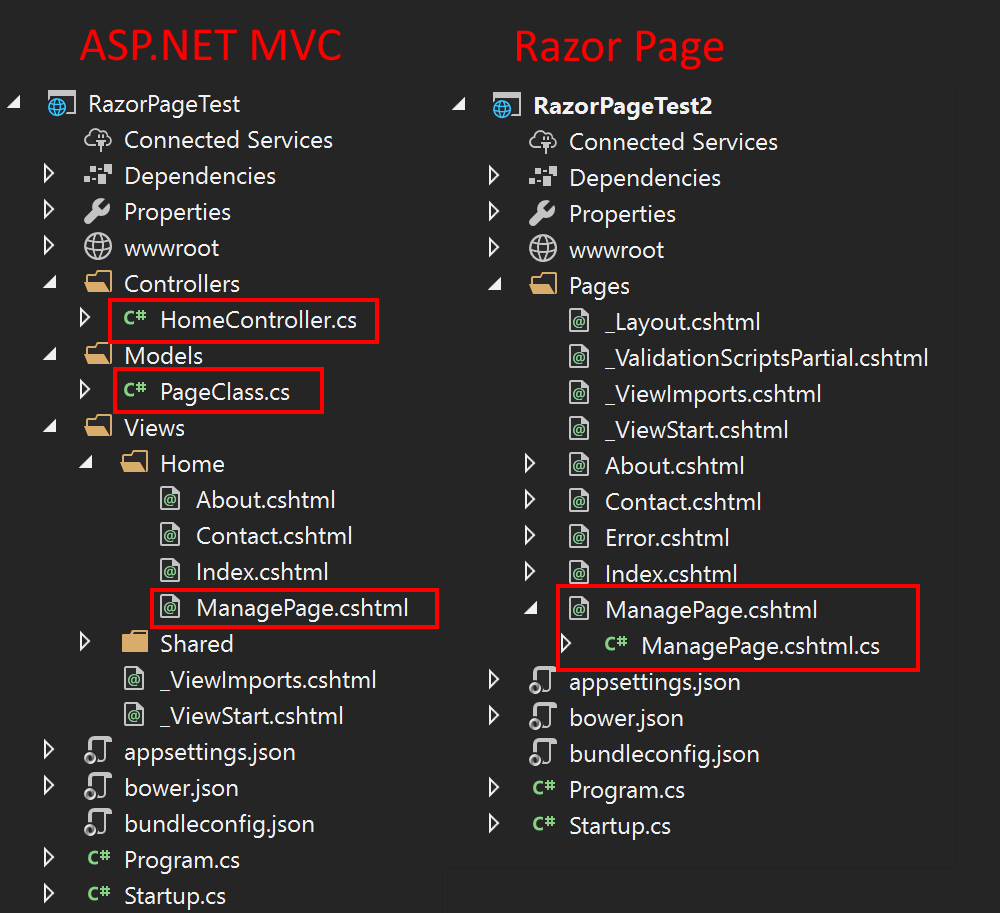
相關文章參考:
ASP.NET Razor Pages vs MVC – How do Razor Pages fit in your toolbox?
Introduction to Razor Pages in ASP.NET
為什麼比較容易懂 ?
- 用 code behind的方式,在 Pages目錄下,一個 .chhtml 對應到一個 .cs檔案
- 以前在 Controller目錄下,一個 Controller Class內部不止針對網頁回傳而且也會有ajax回傳資料的方法,但在 Razor Page的目錄下就只會針對其 csthml實作 OnGet, OnPost方法,比較單純
- 使用 annotation [BindingProperty]作 databinding, cs file本身就是 model file
reference from ASP.NET Razor Pages vs MVC – How do Razor Pages fit in your toolbox?
2016年7月5日 星期二
ASP.NET Core 1.0 所碰到的問題
Announcing ASP.NET Core 1.0 6/27正式版出爐,因為之前 preview 2的版本在執行時, 載入javascript file時會一直出現 502 bad gateway的訊息,但在 MVC 5就不會出現這種情況,所以就試試安裝正式版的 Core 1.0 。
首先要先更新 VS 2015至 update 3的版本,才可以下載 .NET Core 1.0 for Visual Studio。
安裝完之後,之前開發 Core的方案建議重新建立新的。執行後也就沒什麼問題了。
但是發現一個 Nuget元件 RouteJs 執行時出現錯誤(但在 preview 2是正常的),
一個 tool Docker Tools for Visual Studio 2015 - Preview無法安裝成功 ,
目前正在努力上網找答案中~~~~
2016.07.07 Docker Tools for Visual Studio 2015 - Preview可以安裝成功,只要先安裝 Windows Management Framework 即可。
首先要先更新 VS 2015至 update 3的版本,才可以下載 .NET Core 1.0 for Visual Studio。
安裝完之後,之前開發 Core的方案建議重新建立新的。執行後也就沒什麼問題了。
但是發現一個 Nuget元件 RouteJs 執行時出現錯誤(但在 preview 2是正常的),
一個 tool Docker Tools for Visual Studio 2015 - Preview無法安裝成功 ,
目前正在努力上網找答案中~~~~
2016.07.07 Docker Tools for Visual Studio 2015 - Preview可以安裝成功,只要先安裝 Windows Management Framework 即可。
2018年6月8日 星期五
Asp.Net Core 2.1 實作 https超簡單
參考資料
ASP.NET Core 2.1 roadmap
Enforce HTTPS in ASP.NET Core (2.1)
之前開發 1.0時,因為我的程式會直接包成 docker image並佈署在 CentOS上,要設定網頁強制走 https好像不是那麼容易,想不到在 2.1的版本上,微軟很給力的讓整個設定變方便了,真的要給個讚
在 2.1基本產生的專案,在 development mode就會預設給你一個 ceterficate用,不用擔心憑證從那裡來
ASP.NET Core 2.1 roadmap
Enforce HTTPS in ASP.NET Core (2.1)
之前開發 1.0時,因為我的程式會直接包成 docker image並佈署在 CentOS上,要設定網頁強制走 https好像不是那麼容易,想不到在 2.1的版本上,微軟很給力的讓整個設定變方便了,真的要給個讚
在 2.1基本產生的專案,在 development mode就會預設給你一個 ceterficate用,不用擔心憑證從那裡來
2017年8月17日 星期四
.NET Core 2.0正式釋出
有人說使用微軟的東西,要 2.0才開始進去玩,如 ASP.Net 2.0 , .Net Framework 2.0等,這次 .NET Core 2.0發表了,有興趣的朋友可以開始玩囉,不過我覺得 .NET Core 1.1就很好用,感覺 2.0的專案又跟 1.*的不太一樣,要花點時間了解
微軟.NET Core 2.0正式版出爐!
微軟.NET Core 2.0正式版出爐!
2017年7月31日 星期一
🌟🌟🌟使用 ASP.Net Core Web API 開發 Line bot, messaging api可以顯示 emoji或 sticons的圖示 💗💗💗
使用 ASP.Net Core Web API 實作 Line Bot webhook callback 開發系統,可以傳貼圖、文字,但我希望可以在傳文字時加上表情符號或 emoji的圖示,原本是到 https://www.emoji.codes/ 網址,搜尋到圖示後找到對應的代碼如 :star:,再把字串填入在回傳字串內,這樣的作法,圖示會正常顯示在電腦版的 Line上,但手機版的 Line就無法正常顯示了。
第二種作法就是在 .Net Core加上一個 negut libaray Unicode.net ,直接在回傳字串加上 Emoji.圖示代碼,比如 Emoji.Heart,這樣手机版、電腦版就都可以顯示,只不過圖示會有所不同。
第二種作法就是在 .Net Core加上一個 negut libaray Unicode.net ,直接在回傳字串加上 Emoji.圖示代碼,比如 Emoji.Heart,這樣手机版、電腦版就都可以顯示,只不過圖示會有所不同。
2016年12月18日 星期日
使用 asp.net core實作一個類 google blog的網站
之前有分享過 試作 CKEditor 圖片選擇器 ( image upload ),利用 ckeditor和客制 image picker
來達成圖片選取,但是圖片的處理、儲存還沒實作完成,最近剛好寫完預算系統,所以利用空檔來繼續完成這個部份,完成工作內容如下:
2019年1月6日 星期日
ASP.Net Core 2.2 在 Docker container使用 EF Core連結 SQL Server出現問題
參考:SqlException: Connection Timeout Expired. The timeout period elapsed during the post-login phase.
在 windows 環境下直接執行 asp.net core 2.2的程式透過 entity framework core連接 SQL server是沒有問題的情況,想說放在 docker上執行,但一直發生 timeout的情況,後來找到一篇文章提到要更新 SQL Server的 patch到最新的版本試試。
在 windows 環境下直接執行 asp.net core 2.2的程式透過 entity framework core連接 SQL server是沒有問題的情況,想說放在 docker上執行,但一直發生 timeout的情況,後來找到一篇文章提到要更新 SQL Server的 patch到最新的版本試試。
2022年1月11日 星期二
Line Messaging API - Flex Message 更好看的呈現方式
參考文件
Sending Flex Messages (Line官方)
使用 2020 Flex Message 的 10 個新功能 – 讓您在 LINE 的訊息設計更有彈性
在 Flex Message之前已經有 Template的格式可以使用,但使用 Chrome Extension的 Line是無法顯示,所以開發的方式都是以 Text在回覆。
2016年7月7日 星期四
我的第 1個 Asp.Net Core Docker Image
解決了安裝 Docker Tools for Visual Studio 2015 - Preview的問題後,馬上把我的專案放到 docker,我採取的方式是在自己電腦上,所以本機要裝 docker toolbox,windows 10的用戶可以直接裝 docker for windows的版本,我參考的文件如下:
偵錯本機 Docker 容器中的應用程式
把 ASP.NET Core 應用程式裝進 Docker 裡 – 使用 Docker Tools for Visual Studio 2015
如果沒有 powershell的話,要先裝 Windows Management Framework
如果你跟我一樣使用 docker toolbox的話要先把一個 docker machine virtualbox VM先 start, ,而且在專案檔案 \Properties\Docker.props上給定 DockerMachineName的值才行
這樣應該就可以了~~~~
偵錯本機 Docker 容器中的應用程式
把 ASP.NET Core 應用程式裝進 Docker 裡 – 使用 Docker Tools for Visual Studio 2015
如果沒有 powershell的話,要先裝 Windows Management Framework
如果你跟我一樣使用 docker toolbox的話要先把一個 docker machine virtualbox VM先 start, ,而且在專案檔案 \Properties\Docker.props上給定 DockerMachineName的值才行
這樣應該就可以了~~~~
2018年2月26日 星期一
Line Bot 加入選單
目前有兩種方式可以加入選單
方法1 使用 Messaging API的方式,可以達到動態設定
方法1 使用 Messaging API的方式,可以達到動態設定
如果要使用 Messaging API 可以參考 官方 API參考
方法 2使用 Line Manager內設定,可以設定多個並指定日期
在 Line Manager請點選建立圖文影音內容,請新增一個圖文選單,相關欄位請輸入,有6格或 4格可以選擇,下列的方式是用文字 + 圖標方式,是比較簡單的,也可以用圖片製作,輸入完成之後就儲存

到基本設定請把行動官網選單設為隱藏

設定完成之後,使用手機開啟 Line bot應該就可以看到如下的畫面了

需要建立 rich menu,上傳 rich menu image ,設定別名,指定預設 menu等作業,不同作業有不同的 API (網址),帶入參數除了 token之外,其它大部份一般都是用 json格式,使用者可以實作程式控管,但如果不常變動,建議可以使用 Postman來完成工作即可
背景圖的繪製可以至 Pixlr.com 完成
在 Line Manager請點選建立圖文影音內容,請新增一個圖文選單,相關欄位請輸入,有6格或 4格可以選擇,下列的方式是用文字 + 圖標方式,是比較簡單的,也可以用圖片製作,輸入完成之後就儲存

到基本設定請把行動官網選單設為隱藏

設定完成之後,使用手機開啟 Line bot應該就可以看到如下的畫面了

2016年7月21日 星期四
我的第 2個 Asp.Net Core Docker Image 使用 SVN + Jenkins

在 第一個 Asp.Net Core Docker Image的分享有用 Docker Tools for Visual Studio 2015 - Preview產生 Docker Image,但我想要作一點不一樣的事,目的很簡單,就是希望可以程式更新完之後,就可以完成自動產生 Docker image和建立 container,完成相關佈署。
依據這一本書的建議,利用 Jenkins來達到我想要的目的。相關的實作目前已完成第一步自動產生 docker file,再來就是要作實作建立 container的部份囉,等實作成功再來分享我的步驟。
真的不得不說, Docker是天上給予我最好的禮物了~~~
2016年12月26日 星期一
Use Line Bot to search extensions and MVPN numbers of the enterprise
Last time I shared my first Line Bot 使用 ASP.Net Core Web API 實作 Line Bot webhook callback. It is a funny bot to show what kind of person is by entering a name. if you enter a name "Catton", it would answer "He is a handsome man."
Because of first bot, it gave me a inspiration to develop another Lin Bot that could facilitate to contact other colleagues easily. Especially for the enterprise that already has implemention of MVPN.
First of all, here is the wiki to introduce what is MVPN, Mobile virtual private network. You can dial a short number, maybe 5 or 4 digits, to communicate the colleague whose mobile phone is in your enterprise MVPN group.
Inside the enterprise, I can build a web to search someone's extension or MVPN number by entering name, employee number or department name. Here is the screenshot of web-searching.

Because of first bot, it gave me a inspiration to develop another Lin Bot that could facilitate to contact other colleagues easily. Especially for the enterprise that already has implemention of MVPN.
First of all, here is the wiki to introduce what is MVPN, Mobile virtual private network. You can dial a short number, maybe 5 or 4 digits, to communicate the colleague whose mobile phone is in your enterprise MVPN group.
Inside the enterprise, I can build a web to search someone's extension or MVPN number by entering name, employee number or department name. Here is the screenshot of web-searching.

2016年8月2日 星期二
我的第 3個 Asp.Net Core Docker Image - 實作 Docker 1.12 Swarn Mode
利用 我的第二個 Asp.Net Core Docker Image 使用 SVN + Jenkins 的方式,首先先建立一個 docker machine, 再依據 Docker Conference Day 1的影片來實作 Docker Swarm Service Manager and Worker,一下子就成功了,非常容易、非常快速、簡單。大家可以試試。
2016年11月22日 星期二
Asp.Net Core MVC Paging使用了 cloudscribe.Web.Pagination
之前開發 MVC 5專案參考了 ASP.NET MVC 資料分頁 MVCPaging 2.0 應用分享文章,使用了 MVCPaging開發分頁需要的程式,但到 Core之後 MVCPaing官網建議要使用 cloudscribe.Web.Pagination library。
使用 Nuget安裝後要先設定
Startup.cs 要加上 services.AddCloudscribePagination();
_ViewImports.cshtml 要加上@addTagHelper "*, cloudscribe.Web.Pagination"
程式是最大的改變應該是在 View的部份,原本在顯示 page info的部份改寫如下:
使用 Nuget安裝後要先設定
Startup.cs 要加上 services.AddCloudscribePagination();
_ViewImports.cshtml 要加上@addTagHelper "*, cloudscribe.Web.Pagination"
程式是最大的改變應該是在 View的部份,原本在顯示 page info的部份改寫如下:
<cs-pager asp-action="Index" asp-controller="Paging"
cs-pagenumber-param="page"
cs-paging-pagenumber="@Model.PageNumber"
cs-paging-pagesize="@Model.PageSize"
cs-paging-totalitems="@Model.TotalItemCount">
</cs-pager>
測試後的結果應該是沒問題,後續還是要測試每個 tag attribute
訂閱:
文章 (Atom)